We run your project controls.
You make the decisions.
11 applications.
One platform. Zero silos.
Stop losing weeks to manual reporting and disconnected tools. Make faster decisions with data you can actually trust.
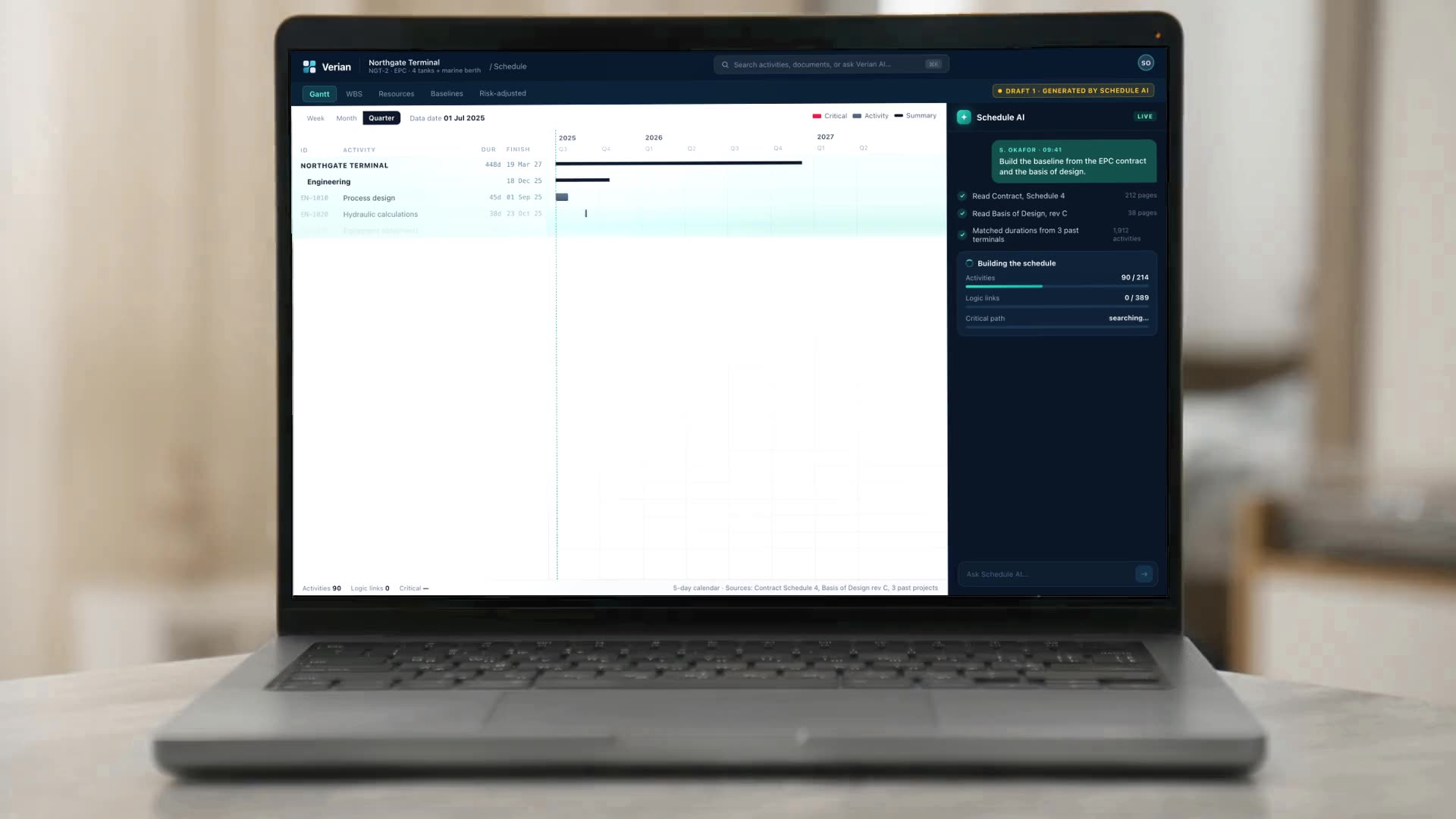
Start every project with a schedule you can already trust.
It is drafted from your own contract, design documents and past projects, and it stays current as the work moves. Your planner decides what changes.
It works where your teams already work.
Meetings, chats, email, schedules, the 3D model, progress from site. Verian picks up what matters from each and brings it together, so nothing important stays buried in someone's inbox.
Questions get answered where they are asked. Anything that would change the project goes to the right person for approval first.



Diagram: one system at the center, reaching eight places: meetings, chats, mailboxes and channels, schedules, the 3D model, progress registers, the field and libraries. Verian reads from each. Answers go back to the person who asked. Proposed changes go to a person, who approves them.
Reads Primavera P6 (XER, XML), Microsoft Project, IFC (Industry Foundation Classes) models, Excel and CSV registers, Outlook, Gmail, Teams channels, Verian Mobile and weather files.
Your tools go in. Intelligence comes out.
Connect the systems you already use. Verian pulls your data in, cleans it up, and turns it into something useful across every part of your project.




- 01
A supplier's letter lands in the procurement inbox.
- 02
Verian reads it and ties it to the activity, the clause and the milestone it affects.
- 03
It checks the impact and proposes a risk to the person who owns it.
- 04
Every application that depends on it is updated, with the source attached.
Illustration: Verian reads the files and messages a project already produces — schedules, 3D models, registers, email, meetings and ERP exports. It connects each one to the work it concerns, checks it, sends anything that does not add up to a person, and updates the applications it affects.
An AI colleague in your project meetings.
Ask a question in the review and get the answer on the spot, with the figures on screen. Your team leaves the meeting with the decision made, not with a list of things to go and check.
Answers in the room's language · EN · FR · DE · NL · ES · AR
The same help in your team chats, whenever a question comes up.
- Add Verian to a Microsoft Teams meeting the way you would add a colleague.
- Ask what is driving a delay or a risk. It answers out loud and puts the figures on screen.
- Answers come from your live project data and say where they came from.
- The same help in your team chats, whenever a question comes up.
It prepares the options. Your people make the call.
When a milestone is at risk, Verian works out ways to recover it and shows what each one gains. Your team picks one and approves it, and the decision stays on the record with the name of who made it.
- Illustration: Verian forks the schedule into three recovery options, re-runs the critical path on each and ranks them. The best becomes a scenario, and the project director approves it onto the live schedule.
See the schedule come to life in 3D.
Your schedule and your 3D model in one picture: what is built, what is under way and what comes next, as of your latest progress update. Put a recovery plan beside the current one and see exactly what moves.
Inside 4D SchedulingA depicted 3D model of Northgate Terminal at the data date, 4 October 2027. Tanks, the pipe rack and the process building are shown as built, being built or not yet built. Tank T-102 is behind its baseline.
03Put a recovery plan beside the current schedule. The work that moves lights up, with the difference in days.
- Play the project from its first day to today and watch it rise.
- This week's progress from site shows up on the model. Anything that does not add up is flagged for a person to check.
- Put a recovery plan beside the current schedule. The work that moves lights up, with the difference in days.
- 01Register row
- 02Match
- 03Model object
- 04Schedule
From a cell in a spreadsheet to a date in the schedule, with a person in between.
In register mode, each color points back to a row, an import and a date.
It carries your organization's experience forward.
Lessons from past projects come back at the moment a new decision is being made, once your own people have approved them.
Your standards, rates, contract wording and past schedules become a working library, ready for the next project from its first day.
Illustration: on the Northgate Terminal project, gate valves arrive two weeks late; the recovery is approved, and a lesson is written from the outcome and approved by the project manager. Months later, on a wind-farm project, the same lesson appears beside the valve package in the procurement plan, and applying it moves the order six weeks earlier.
When your best planner moves on, what they learned does not have to.
It lives inside your organization. It answers to it.
“Inside your organization” describes where Verian works, not where it is hosted. Verian is hosted on Microsoft Azure.
Verian works in your reviews and your records the way a colleague would: with a login, a role, limits and a history. The reaches you have seen pass checkpoints you control.
Diagram: a boundary marked “your organization” around Verian. Each reach passes a checkpoint: access on meetings and chats, approval on the schedule, evidence around Verian itself and an audit trail. The hosting layer, Microsoft Azure, sits outside the boundary.
- Access
Verian answers each person with that person's access. In a group chat, it shares what everyone there may see.
- Approval
On the live schedule, Verian proposes and a person with the authority approves. Scenarios are a sandbox. Baselines are locked.
- Evidence
Figures are computed by tools, not by the language model, and cite the record they came from. Forecast dates show their working.
- The room
In meetings, Verian answers from the record when someone says its name. “Verian, stop” and “Verian, leave” work for anyone present.
- Administration
Your Microsoft administrator approves Verian once, and each person links their own account. Verian in Teams stays off until your organization turns it on, and an administrator can switch it off across the organization, including in meetings under way.
- Residency
Hosted on Microsoft Azure. Each organization's data is isolated from other organizations' data, row by row.
SOC 2 and ISO 27001: in progress. We do not display badges we have not earned.
How Verian is securedStop gathering the data. Decide on it.
Start with one project. Send us its schedule, its 3D model if you have one, and the registers your teams already keep. Our team sets it up on Verian and runs the record from then on. You log in, see it live, and decide.
- 01Connect
The schedule, the model, the registers.
- 02Reconcile
See where your versions of the truth diverge.
- 03Run
Our team keeps the record current. You decide on it.
- 04Prove
Decisions carry their evidence when they are challenged.
Questions, answered plainly
What procurement, IT and project controls teams ask first.
Does Verian change our schedule on its own?
No. On the live schedule, Verian proposes and a person with the authority approves, and the approval is recorded. Scenarios are a sandbox Verian can change freely, and baselines are locked. Progress from the field and from 4D Scheduling reaches the schedule the same way: after a preview and an approval.
What does Verian do in a Microsoft Teams meeting?
Someone in the meeting adds it. It says it is an AI, follows the meeting through its live captions and answers out loud when someone says its name, in English, French, German, Dutch, Spanish or Arabic, with the figures on a shared screen. It answers with the asker's access, and the questions put to it and its answers are kept under your retention policy. Verian in Teams stays off until your organization turns it on.
Where is Verian hosted, and who can see our data?
Verian is hosted on Microsoft Azure. Each organization's data is isolated from other organizations' data at the row level, and Verian answers each person with that person's own access. SOC 2 and ISO 27001 certification is in progress.
What does it mean that Verian learns?
Verian drafts lessons from what your projects recorded, and your own review workflow decides which ones stand. Approved lessons, the libraries your organization curates and the record of your projects are what it draws on. It also keeps a few notes on how each person likes to be answered, which change how an answer is said, not what that person may see.
Which files and systems does it work with?
Schedules from Primavera P6 (XER and XML) and Microsoft Project; 3D models in IFC (Industry Foundation Classes); Excel and CSV registers; the Outlook, Gmail and Teams channels you connect; field progress from Verian Mobile; and a Power BI feed bound to each person's access. Connectors for SAP, Oracle JD Edwards and other ERPs are designed to bring invoices and commitments into cost control.
How do we start, and how is Verian priced?
With one project. In a working session we open your live schedule, and your 3D model if you have one, in Verian with your team. Verian is licensed per project, scoped to your portfolio and the capabilities you use.